Running Local LLMs Offline on a Ten-Hour Flight

Update, 29 April 2026
This post was picked up on Hacker News and crossed 100 comments. I love that this sparks emotions. As always, there is a fair mix of reactions, which is exactly what you would expect from HN. Scroll to the bottom for extra responses to some of the comments.
…
Cloud Next was intense. I wrote the first version of this post at 9am my time while dozing off, and I did not expect much interest in it. Given the attention it is now getting, I gave the post the attention it deserved: corrected the model details, added more context about the setup, and responded to the most common points.
I flew from London to Google Cloud Next 2026 in Las Vegas. Ten hours with no in-flight wifi. I used the time to test how far a modern MacBook can carry engineering work on local LLMs alone.
Setup
A week-old MacBook Pro M5 Max, 128GB unified memory, 40-core GPU.
The model doing the useful work was qwen/qwen3.6-35b-a3b via LM Studio.
Top 100 most common docker images, top programming languages, and enough dependencies to build function sites with rich visualisations.
Countless CLIs, with opencode, rtk, instantgrep and duckdb being most used.
What I built
A billing analytics tool covering two years of loveholidays cloud spend. DuckDB underneath, with a custom UI for slicing the data along dimensions the standard dashboards don’t expose. It surfaced patterns and cross-service correlations that had been hard to uncover.
I was interested in exploring this area for a while, but I could never prioritise it against the whirlwind of my other responsibilities. With 10 hours to spare, top-of-the-range hardware and an OSS model, I decided to give it a go.
Alongside that, I processed roughly 4M tokens on smaller tasks: refactors, CLI scaffolding, documentation. For tight-scope work, Qwen produced output comparable to the frontier models I normally use.
That is the part that surprised me most. Less than two years ago I flew to New York with an M1 Max and 64GB of memory, and local coding with models at the time was next to unusable. It could generate some chat replies and eventually create a basic Go file after many minutes, but it was not enjoyable. Hardware, models, and agent harnesses have moved a long way since then.
What broke
Three limits showed up.
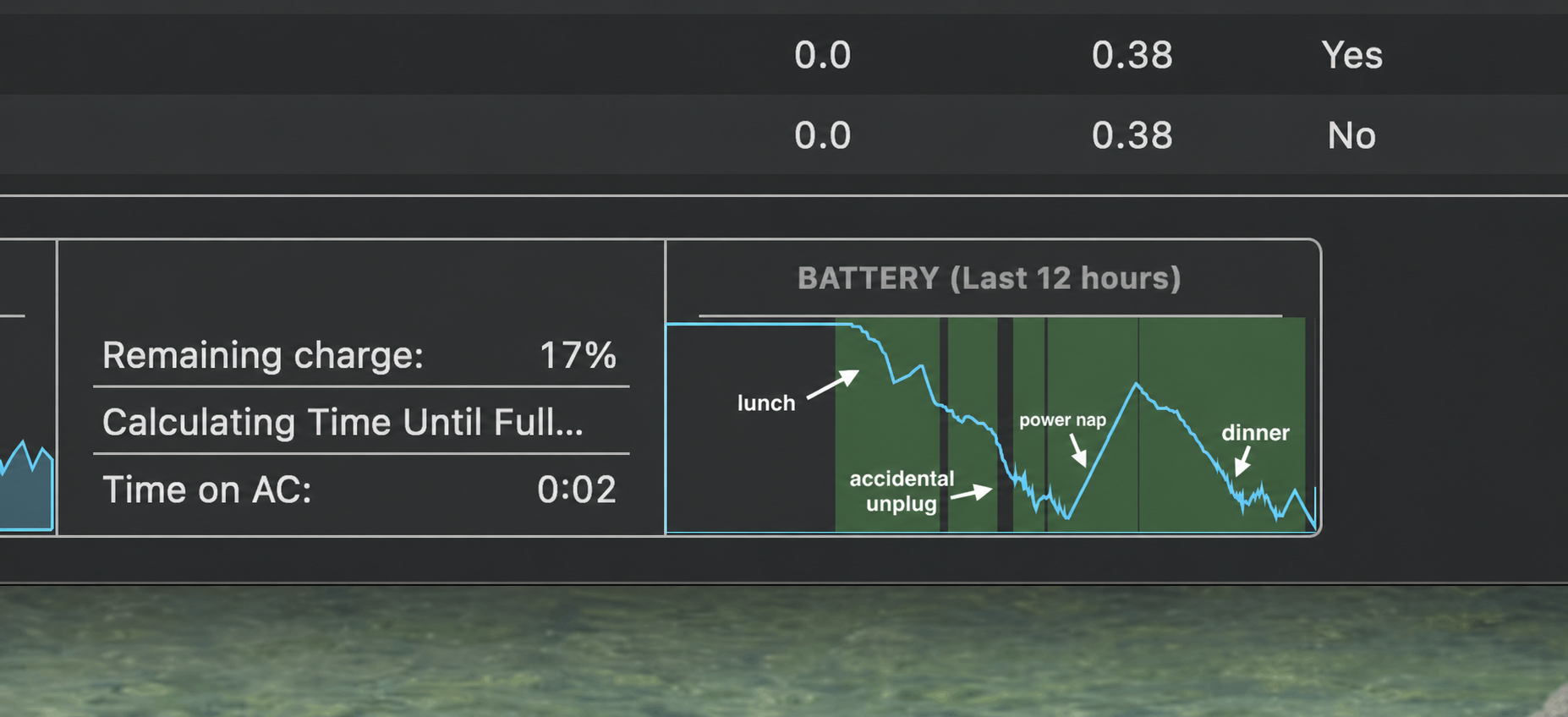
Power. Roughly 1% of battery per minute under sustained load. The battery drained even when plugged into 60W of power.
Heat. At 70–80W sustained, the chassis runs hot enough to be uncomfortable. The in-flight blanket and pillow saved my knees, but made the overheating problem even worse.
The battery timeline tells the story neatly: you can see lunch, the accidental unplug, the “power nap” - pun intended - and dinner.
Context. Throughput and latency degrade noticeably past 100k tokens.
Loops. A handful of prompts sent the model into an infinite loop that needed manual intervention to break. Unclear whether the fault sat at the opencode orchestration layer or the model itself.
What helped: one problem per session, long plans written to markdown for re-ingestion, and minimising tool-call overhead with rtk. I avoid compaction - it is very slow to run.
Instrumentation
I built two tools during the flight.
powermonitor - a CLI that reads Mac power telemetry (CPU, GPU, ANE, adapter, battery) live. I’ve since pushed a fix for faster detection of adapter power-source changes.
⚡ Total: 81.6 W
   Charging (split updates when battery % changes)
   CPU: 4.5 W   GPU: 77.2 W   ANE: 0.0 W
   Adapter: 60 W
   Battery: 14%   Source: AC

Power (W)
▁▂▃▃▄▃▄▄▅▄▅▅▅▄▅▄▅▅▅▄▅▆▅▄▅▅▆▅▄▄▅▄▅▅
Min: 47.5  Avg: 71.5  Max: 87.3 W
14144 samples
lmstats - reads LM Studio telemetry and reports token throughput, latency distributions, and context-window behaviour across a session.
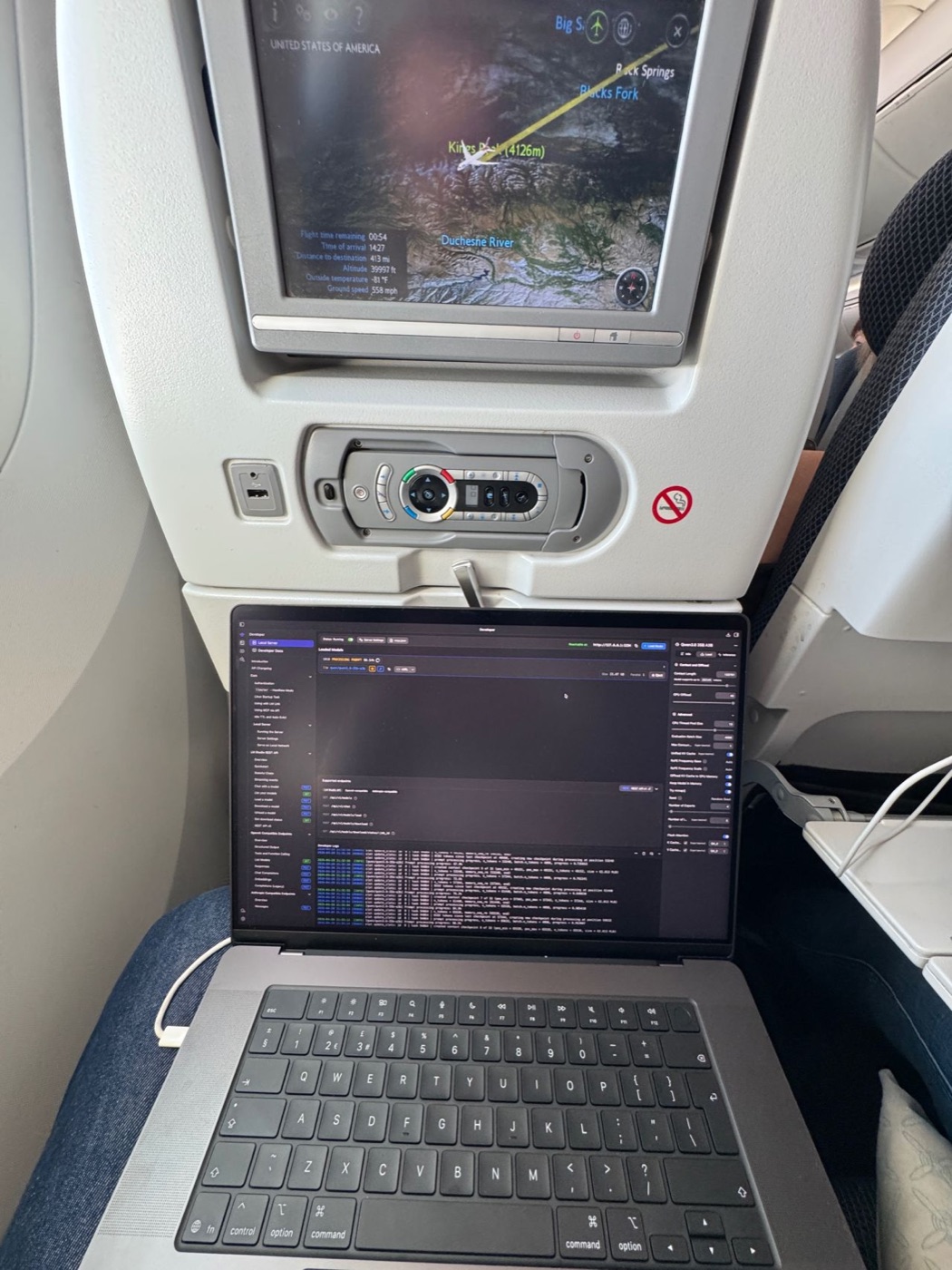
I was not using the tray table here. The laptop was on my lap, with a blanket and pillow as insulation from the heat and as a small height boost. It was zero ergonomic and really uncomfortable, but I had a real endorphin rush from how good local LLM inference has become, and that kept me going through the discomfort.
Both tools follow the same pattern we apply at loveholidays at a larger scale: instrument the system before acting on it.
I intend to keep developing powermonitor using only local LLMs. Some good feedback has made me more motivated to continue the experiment. One person pointed me at mac-adapter and said powermonitor was already more feature-rich for testing USB PD supplies.
Community responses
The original LinkedIn post attracted several threads worth engaging with.
Steve Turner noted that running local, where cost is physically visible, made him more critical of what he asks of cloud models. This is the mechanical sympathy principle applied to AI - direct exposure to heat, power, and context effects builds intuition about where inference is cheap and where it’s expensive. That intuition transfers back to cloud usage.
Jackson Oaks made the case for Apple Silicon perf-per-watt over NVIDIA for battery-constrained workloads.
The cable
British Airways advertises 70W per seat. Powermonitor showed 60W delivered on the outbound flight. I decided to get to the bottom of this discrepancy upon arrival.
In the hotel I tested the M5 Max under equivalent load with two cables. Same adapter, same socket, same workload.
iPhone cable: 60W delivered
MacBook cable: 94W delivered
A 34W gap (36%) from cable selection alone. On the outbound flight I was throttling myself to 60W against a 70W ceiling.
Know your cables if you want to get the most out of your charger.
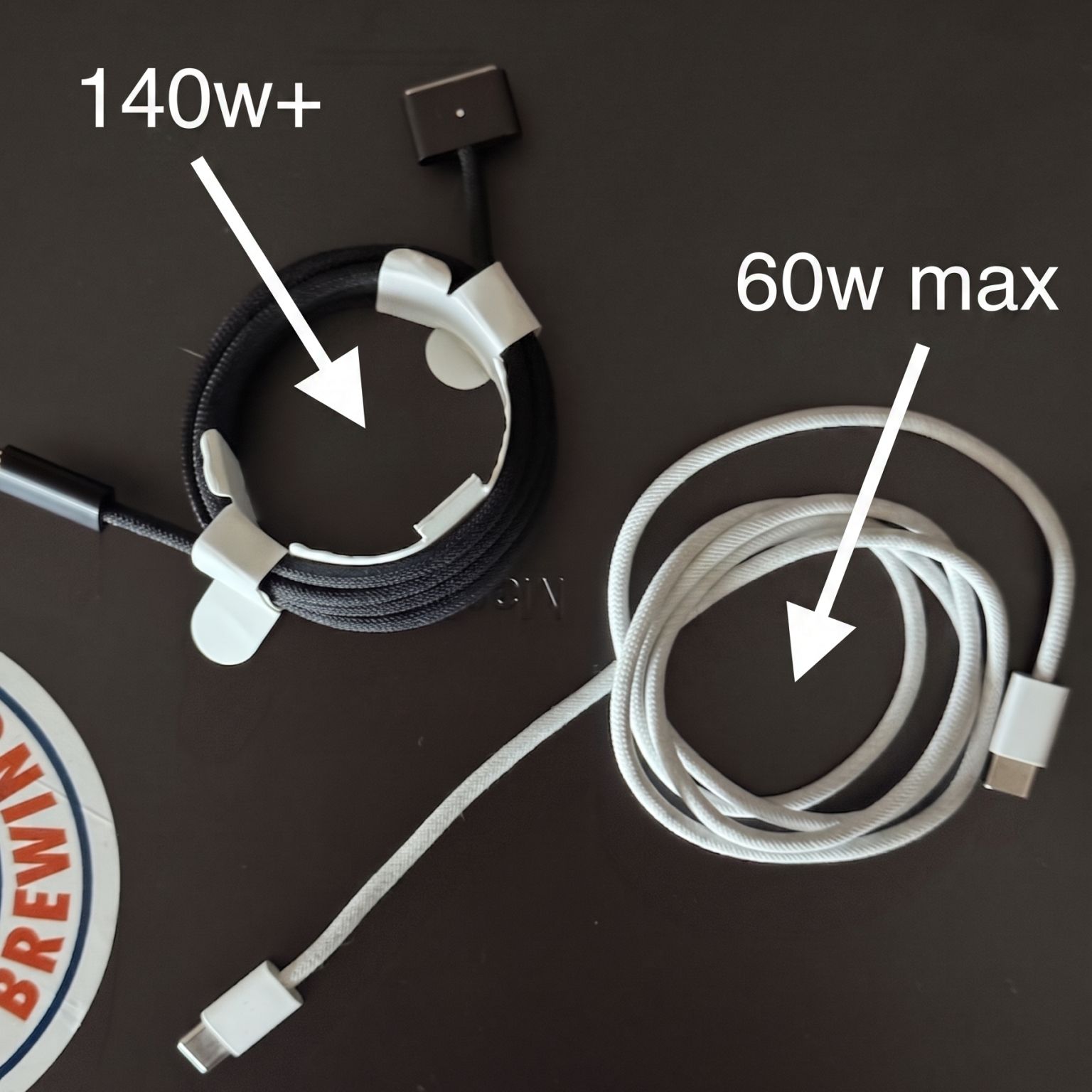
Return flight will test this with the correct cable. I expect at least 16% improvement against the 70W cap, more headroom once the cable isn’t the limit.
Without instrumentation I wouldn’t have discovered my mistake of using an iPhone cable.
Takeaways
Local inference is viable for a meaningful subset of engineering work: tight-scope coding, exploratory tooling, and tasks that don’t clear the cost-benefit bar with cloud inference. Large-context reasoning, agentic workflows needing frontier intelligence, and high-value tasks still belong in the cloud.
The secondary effect: local exposure to inference cost forces discipline around prompt size, tool-call overhead, and context management. That discipline carries back to cloud usage.
What’s next
Return flight with the correct cable. Publishing the numbers.
Explore Neural Engine-powered small LLM models for their usefulness, speed, and power consumption, as it is supposed to be very efficient to run.
Continue powermonitor as a local-LLM-only project so I can watch the evolution of tooling, models, and hardware against a real codebase.
Extra Hacker News responses
On the window seat and laptop size. One comment called the window seat with a 14-inch laptop claustrophobic. The laptop was actually 16-inch, which is better for battery life and cooling, and much worse for available space.
On the seat in front. I picked a window seat because you do not get distracted by others getting up, and you control at least 50% of your space. The seat in front reclining was a bit of an issue, but this was seat 42A on a Boeing 787, with no seat behind me, so I could recline without creating the same nuisance for somebody else.
On ergonomics. The ergonomics were awful. I did not use the tray; I kept the laptop on my lap with a blanket and pillow. The “T-rex arms” description is exactly how it feels using a 16-inch laptop in economy, and I may update the landing image because it captures the mood so well. Premium Economy has side-loaded trays, and those are genuinely good for productivity.
On the Bluetooth keyboard tip. A few people suggested putting the laptop on the tray table and a Bluetooth keyboard on your lap underneath it. That is a great idea, especially for vim, emacs, or any keyboard-driven editor workflow. Also: next-level dedication to in-flight coding.
On another offline-coding flight post. I learned about 40,000 feet, a fellow offline-coder post from September 2025. The pace of change since then is wild: hardware, models, and harnesses have all moved forward.
On whether this is relatable. One comment pointed out that trying local LLMs in the air on a EUR 6,200 laptop is not exactly relatable. Fair. The goal was not to save money, even after producing roughly 4M tokens, and I am not claiming this is mainstream. I wanted to capture the current state of the art: it is now possible to produce meaningfully useful work offline using hardware that is permitted on board.
At work I use top-of-the-range Codex and Opus because I am trying to maximise output per unit of time. But this experiment changed my view of where self-hosted LLMs fit. For high-volume, low-criticality use cases - for example summarising millions of customer-support chats where mistakes have low downside - local or self-hosted inference can keep data private and save a lot of token cost. This helped me solidify the business case for buying RTX 6000 Pros and seeing how much further it can go. I am privileged to have access to a top-of-the-range M5 Max, but I intend to put it through 4-5 years of heavy daily and nightly use, which should make it good value overall.
On remote workstations. Tailscale, mosh, and tmux are a really nice way to connect to a workstation. I agree completely. I have a stack of Mac Minis at home churning 24/7, and I use Tailscale and tmux to check on them periodically.
On whether working while travelling is a con rather than a perk. I agree if it is forced on you. In this case it was my choice to work on an area I am hugely interested in. I could have watched films I missed or played Zelda on the Nintendo, but offline coding was the most fun thing for me to do. Modern life rarely gives us a 10-hour stretch to ourselves; we share our time with those we love, our colleagues, and our communities. This flight was a selfish indulgence in following my passion.
Last tidbit: Spot the Hacker News traffic.